Cloud migration is no longer just for large corporations: in 2025, 52.7% of EU businesses and 44.3% of Spanish businesses with 10 or more employees paid for cloud services. What separates a good migration from a bad one is not whether you make the move but how you make it: organisations estimate that they waste 29% of what they spend on cloud infrastructure and platforms.
This guide explains, without favouring any provider, how to plan a cloud migration: which strategy to choose for each application, how to do it step by step, what it costs and how to keep it under control, what changes for security, and what the GDPR, the Data Act, DORA and NIS2 require, with specific notes for organisations in Spain and the UK. It uses official 2025 and 2026 data and ends with a checklist.
Cloud migration in 60 seconds
What it is: moving applications, data and infrastructure from your own servers (on-premises) or traditional hosting to a cloud provider's services, or from one cloud to another.
It isn't all or nothing: 73% of organisations use hybrid cloud, according to Flexera. Most businesses combine their own infrastructure, public cloud and SaaS.
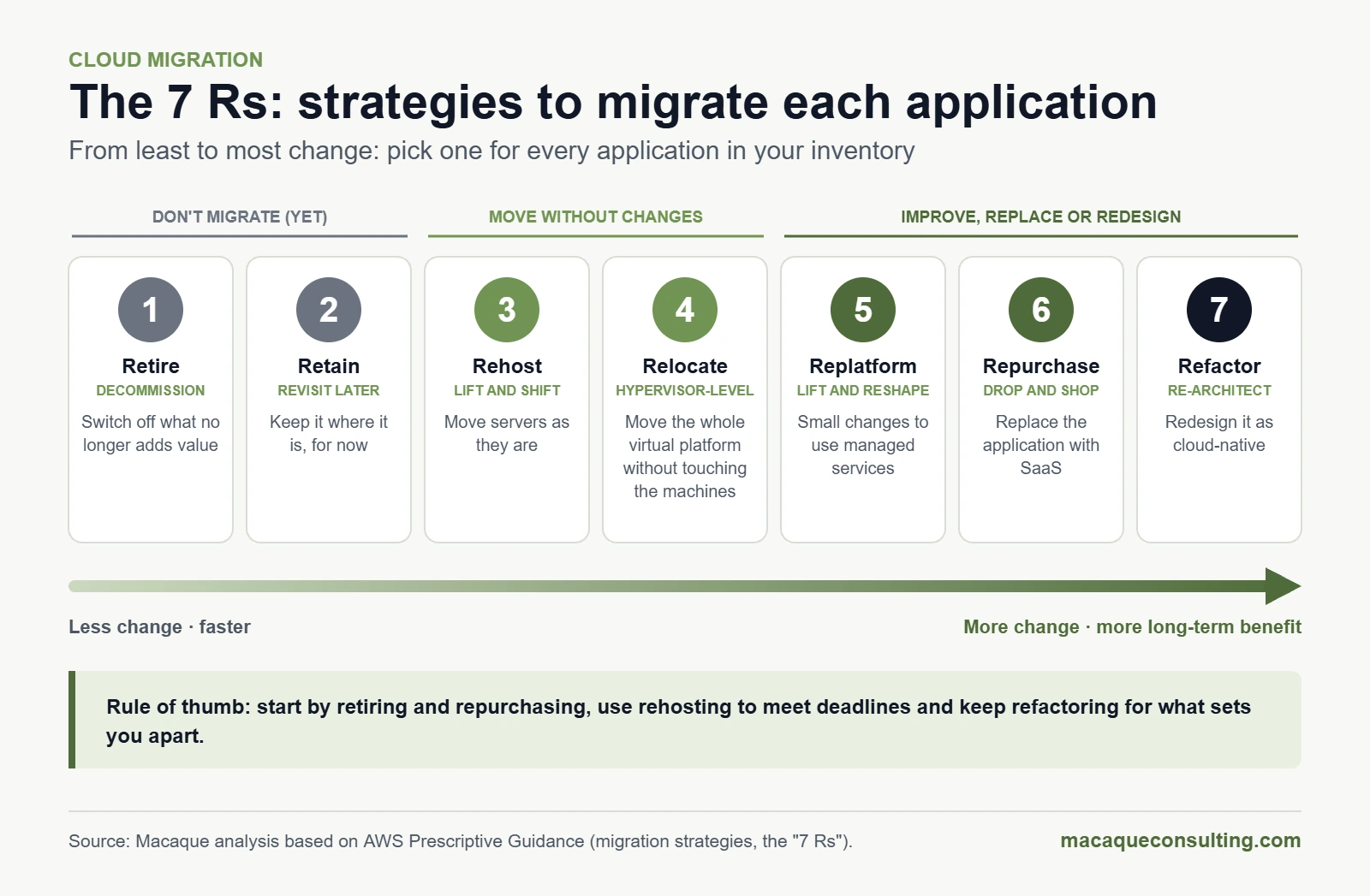
Every application needs its own strategy: retire, retain, rehost (lift and shift), relocate, replatform, repurchase or refactor. These are the "7 Rs".
Savings don't happen on their own: without cost governance (FinOps), the cloud can cost more than your data centre.
Security is shared: the provider protects the infrastructure; your data, identities and configurations remain your responsibility.
Regulation moves with you: GDPR (or UK GDPR), the EU Data Act, DORA in financial services and NIS2; in Spain, also the ENS if you work for the public sector.
Key date, 12 January 2027: Windows Server 2016 extended support ends, and cloud providers can no longer charge EU customers for switching provider.
What is cloud migration?
Cloud migration is the process of moving workloads (applications, databases, servers, storage or desktops) from your own data centre or traditional hosting to a cloud platform, or from one cloud to another. It can be as simple as moving email to a cloud service or as complex as redesigning an ERP to run on managed services.
There is no single way to do it. Before moving anything, you need to settle two decisions: where each workload will live (the deployment model) and how much of the technology you want to keep managing yourself (the service model).
Public, private, hybrid and multi-cloud
Public cloud: a provider's shared infrastructure (AWS, Microsoft Azure, Google Cloud, Oracle, IBM, OVHcloud…), with pay-as-you-go pricing and almost immediate capacity.
Private cloud: resources dedicated to a single organisation, in its own data centre or a provider's. More control and isolation, less elasticity.
Hybrid cloud: your own or private environment combined with public cloud, connected and managed together. It is the most common model.
Multi-cloud: several public cloud providers at once, for service, price, resilience or regulatory reasons. It adds flexibility but multiplies the complexity of security, costs and skills.
IaaS, PaaS and SaaS: what you manage and what the provider manages
Model
What the provider gives you
What you still manage
Examples
IaaS (infrastructure as a service)
Virtual servers, storage and networking
Operating system, middleware, applications, data, configuration and access
Amazon EC2, Azure Virtual Machines, Google Compute Engine
PaaS (platform as a service)
A ready-to-deploy platform: managed databases, runtimes, containers
Applications, data, configuration and access
Azure App Service, Google Cloud Run, Amazon RDS
SaaS (software as a service)
The complete application, ready to use
Data, users, permissions and configuration
Microsoft 365, Google Workspace, Salesforce
The higher you go (from IaaS to SaaS), the less you operate and the less you control. That choice shapes the costs, the security and the migration strategy for each application.
Cloud migration in numbers (2025–2026)
Official data confirms that the cloud is now mainstream in Europe, that Spain still lags behind and that the big challenge is no longer adopting the cloud but governing it:
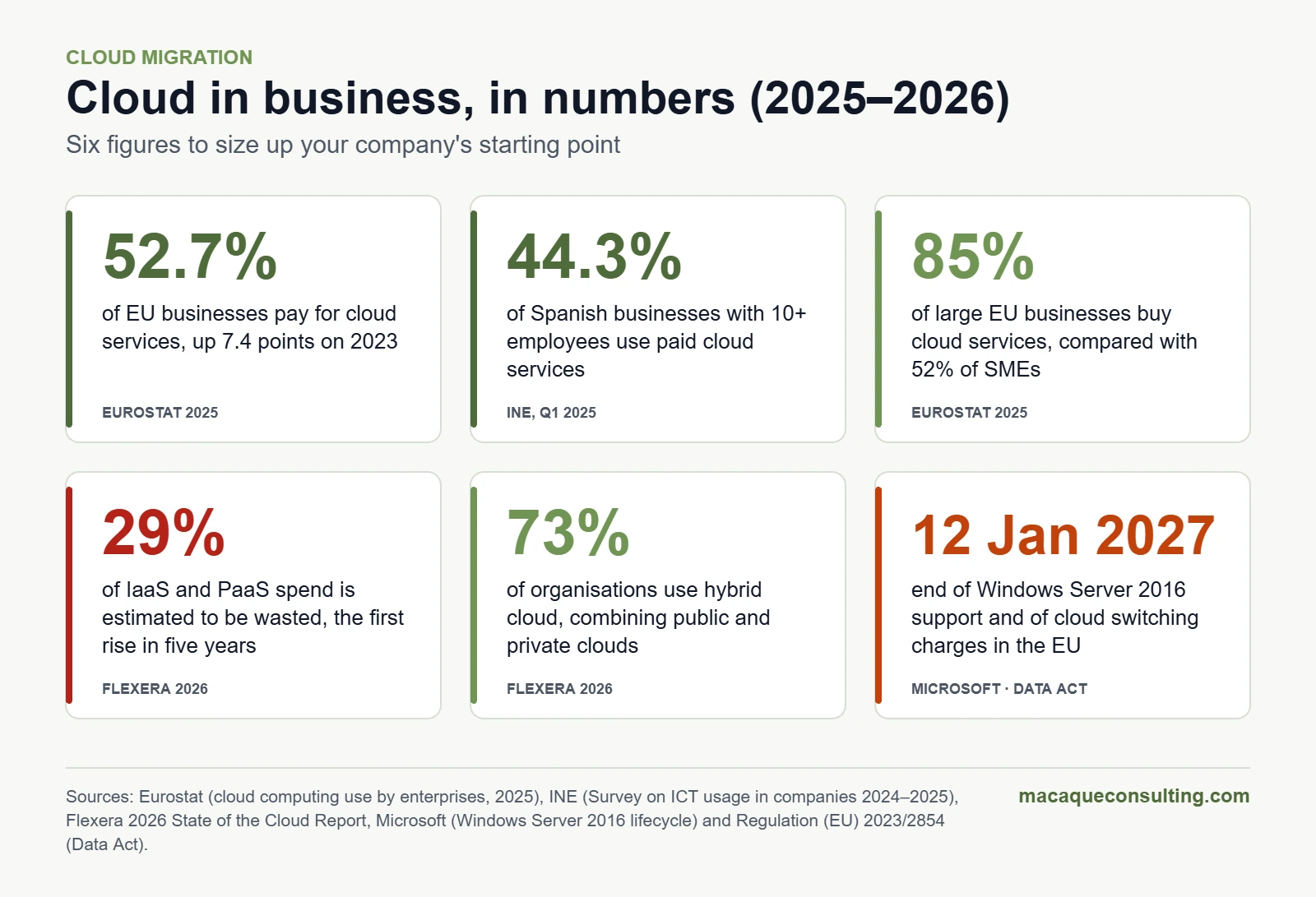
52.7% of EU businesses paid for cloud services in 2025, up 7.4 points on 2023. The most common uses among them: email (85.2%), office software (71.7%) and file storage (71.5%) (Eurostat).
A size gap: 85% of large EU businesses buy cloud services, compared with 52% of SMEs (Eurostat, 2025 data).
Spain: 44.3% of businesses with 10 or more employees used paid cloud services in the first quarter of 2025, up 6.6 points year on year, led by the services sector (48.7%) (INE). The INE edition published in October 2026 puts the figure at 39.4%; to compare with Europe we use 2025, the latest year with Eurostat data.
Wasted spend: organisations estimate that they waste 29% of their IaaS and PaaS spend, the first increase in five years (Flexera 2026, a global survey of 753 cloud decision-makers).
Cost comes first: 85% say managing cloud spend is their top challenge, and 63% already have a FinOps team (Flexera 2026).
Hybrid by default: 73% of organisations use hybrid cloud (Flexera 2026).
Cloud in business, in numbers. Sources: Eurostat, INE, Flexera, Microsoft and Data Act.
Why migrate to the cloud (and when not to)
Real benefits, when it is done well
Elasticity: you pay for the capacity you use and scale in minutes, without buying hardware for your busiest day of the year.
Continuity: regions with several availability zones, backups and disaster recovery without running a second data centre.
Baseline security: encryption, identity management, platform patching and certifications that a small business would struggle to replicate on its own.
Speed: environments ready in hours, not weeks, and access to data and artificial intelligence services (with the obligations of the EU AI Act if you use them).
Lower upfront investment: you move from buying equipment (CAPEX) to paying for a service (OPEX). The trade-off is a recurring cost that needs governing.
Why now: the 2027 calendar
Windows Server 2016 stops receiving security updates on 12 January 2027, when its extended support ends. Your options: upgrade to a supported version, pay for Extended Security Updates (ESU) as a bridge for up to three years, also available through Azure Arc, or use the deadline to migrate or modernise those workloads.
EU Data Act: since 12 September 2025, EU customers have been able to switch cloud provider with a maximum notice period of two months and a transition that, as a rule, does not exceed 30 days. Until 12 January 2027 the provider can only charge the direct cost of switching; from that date it cannot charge for switching at all, including the related data egress.
VMware: after its acquisition by Broadcom, VMware dropped perpetual licences and moved to bundled subscriptions. If your data centre runs on VMware, your next renewal is a good moment to compare alternatives, including the cloud.
When not to migrate (or not yet)
Stable, predictable workloads on fully depreciated hardware, where the three- or five-year cloud cost would be higher.
Systems with very demanding latency or tied to factory machinery (OT): they usually fit better in hybrid or edge models.
Software whose licence does not allow the cloud or makes it much more expensive.
Regulatory or sovereignty requirements that the available regions and certifications do not cover.
No capacity to run it: without your own team or a partner, a poorly governed cloud is expensive and insecure.
The reverse move also exists: some businesses bring workloads back to their own data centre (known as repatriation). That is why the decision is made application by application, with numbers, not wholesale.
The 7 cloud migration strategies (the "7 Rs")
The most widely used framework for deciding what to do with each application is the 7 Rs, documented by AWS building on Gartner's work; Microsoft and Google use equivalent classifications. Assigning an R to every application is the foundation of any cloud migration plan.
The 7 cloud migration strategies. Macaque analysis based on AWS.
Strategy
What it means
When it fits
1. Retire
Switch off what no longer adds value
Duplicate, unused or already replaced applications
2. Retain
Leave the application where it is, for now
Latency, licensing or regulatory constraints; migration not worth it today
3. Rehost (lift and shift)
Move servers as they are to virtual machines in the cloud
Tight deadlines: a data centre contract ending or end of support
4. Relocate
Move the whole virtualisation platform (for example, VMware) to the cloud without touching the machines
Large virtualised estates that must leave the data centre quickly
5. Replatform
Small changes to use managed services, such as moving the database to a managed service
Applications that gain a lot from a little change
6. Repurchase
Replace the application with SaaS
Email, CRM, HR, office software or standard ERP
7. Refactor (re-architect)
Redesign the application as cloud-native: containers, serverless, microservices
Applications that set you apart and need to scale or evolve fast
Rule of thumb: start by retiring and repurchasing, which deliver quick wins; use rehosting to meet deadlines, with a plan to optimise afterwards; and keep refactoring for the applications that set you apart. AWS itself advises against refactoring during large migrations because it is the most complex strategy to manage at scale. If your challenge is modernisation, see how we approach application modernisation.
How to migrate to the cloud step by step: a 5-phase plan
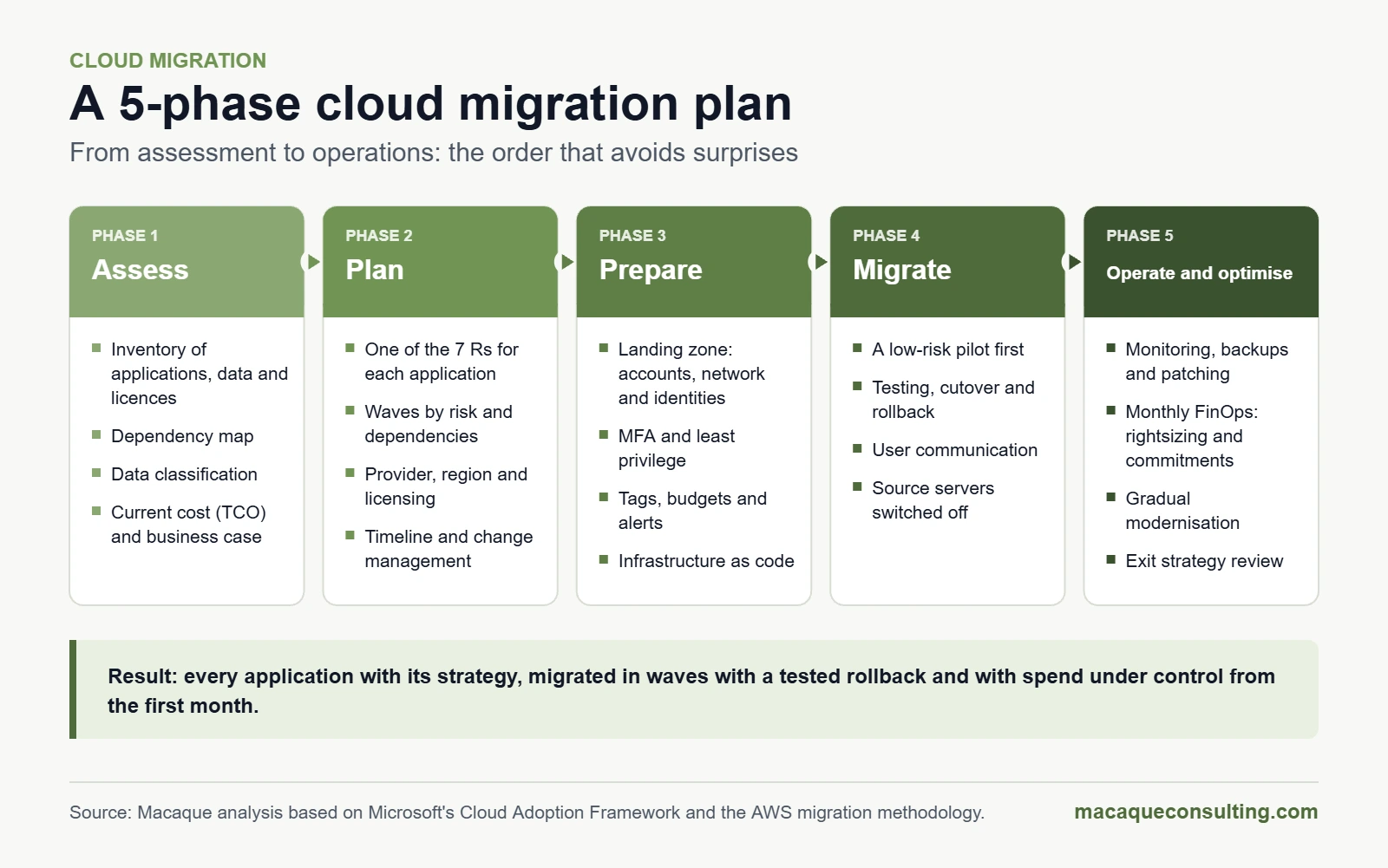
The adoption frameworks of the major providers, such as Microsoft's Cloud Adoption Framework or the AWS migration methodology (assess, mobilise, migrate and modernise), agree on the essentials. This is the order we recommend so that your migration does not turn into a string of surprises:
A 5-phase cloud migration plan. Macaque analysis.
Phase 1. Assess: inventory and business case
Full inventory: servers, applications, databases, licences, contracts and the owner of each system. Providers offer discovery and assessment tools, and some, such as AWS Transform, already use AI agents to automate part of the analysis.
Dependency map: what talks to what. It is what stops you migrating an application and leaving its database behind.
Data classification: personal, sensitive or subject to sector rules such as DORA. It determines the region, the encryption and the contract.
Real current cost (TCO): hardware, licences, energy, space, support and staff time.
Business criteria: what is critical, what downtime is acceptable and how much time and data you can afford to lose (RTO and RPO).
If you don't have that starting point, begin with a technology audit.
Phase 2. Plan: strategy per application and waves
Assign one of the 7 Rs to each application.
Group applications into waves according to their dependencies and risk, and start with a low-risk pilot.
Choose your provider or providers, region and licensing model, including how to reuse the licences you already own.
Build the business case with cost scenarios and a realistic timeline.
Prepare change management: communication and training for users and the technical team.
Phase 3. Prepare: the landing zone
The landing zone is the secure, governed base environment where all workloads will land. Building it before the first migration avoids redoing work on systems already in production:
Account, subscription or project structure by environment and business area.
Identities: multi-factor authentication, least privilege and time-limited admin access.
Network: connectivity with offices and data centres (VPN or dedicated link), segmentation and controlled internet access.
Security: centralised logging, encryption and policies that block dangerous configurations.
Governance: mandatory tagging, budgets and cost alerts.
Everything as code (infrastructure as code), so it is reproducible and auditable. This is DevOps territory.
Phase 4. Migrate in waves
For each wave: replication, functional and performance testing, a cutover plan and a rollback plan.
Cutover windows agreed with the business, and users notified in advance.
Validation after cutover and decommissioning of the source servers: if you don't switch them off, you pay twice.
Phase 5. Operate, optimise and modernise
Monitoring, backups, patching and incident management from day one.
Monthly cost reviews: rightsizing, scheduled shutdowns and usage commitments.
Gradual modernisation: what went in through lift and shift is replatformed or refactored when it adds value.
This phase never ends, and it is where the difference between migrating and knowing how to run the cloud shows most. If you don't want to build an in-house team, you can rely on an IT outsourcing service.
Cloud migration costs and FinOps
Which costs to consider
Migration costs (one-off): assessment, tools, professional services, training and a period of running both environments in parallel.
Recurring costs: compute, storage, networking (including outbound data transfer), licences, provider support and managed services.
Hidden costs: forgotten resources left running, oversized machines, backups and snapshots that never expire, test environments running 24/7 and cross-region traffic.
Incentives: the major providers run programmes that fund part of the assessment or the early consumption of a migration. Ask about them before you sign.
FinOps: governing spend from day one
FinOps is the practice that brings finance, technology and the business together so that every pound or euro spent in the cloud delivers value. The FinOps Foundation organises it into three repeating phases: inform (knowing what is spent and who spends it), optimise and operate. It is not just for large enterprises: 63% of organisations already have a FinOps team and, even so, estimated waste has risen to 29% (Flexera 2026).
Practices that work:
Mandatory tagging (cost centre, environment, owner) from the landing zone onwards.
Budgets and alerts by project or area, and cost reports per team.
Monthly rightsizing reviews and clean-up of orphaned resources.
Automatic shutdown of non-production environments outside working hours.
Usage commitments (reserved instances or savings plans) only for the stable part of your consumption.
Storage tiers and lifecycle policies for backups and logs.
A close watch on AI workloads: according to Flexera, their growth partly explains why waste has risen again.
Cloud security: the shared responsibility model
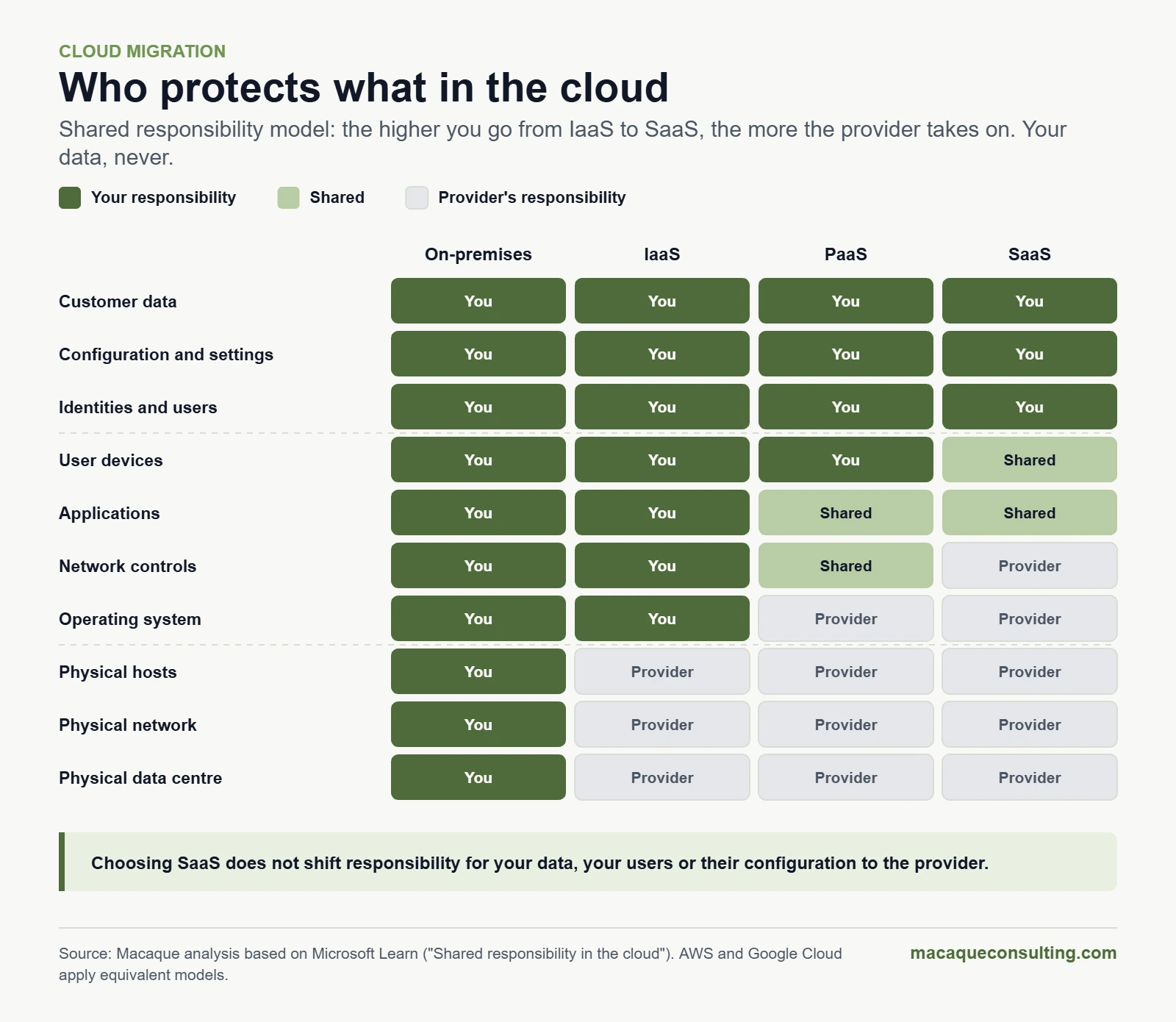
In the cloud, security is shared. AWS sums it up like this: the provider is responsible for security of the cloud (data centres, hardware, physical network, virtualisation) and the customer for security in the cloud. The exact split depends on the service model:
Always yours: data, configuration, and identities and users, whether you use IaaS, PaaS or SaaS.
Depends on the model: devices, applications, network controls and the operating system.
Taken on by the provider: the physical servers, network and data centre.
Shared responsibility model. Macaque analysis based on Microsoft Learn.
Essential controls when migrating
Multi-factor authentication for everyone, and minimal, time-limited, logged privileged access.
Secure configuration, continuously monitored (CSPM), using references such as the CIS Benchmarks.
Encryption in transit and at rest; for the most sensitive data, keys you manage yourself.
Centralised logging and detection and response (SIEM, XDR) that also cover the cloud.
Isolated or immutable backups, outside the main account, and tested restores: the 3-2-1-1-0 rule we explain in our cyber security guide for businesses.
An incident response plan that sets out how and when to involve the provider.
Design for failure: spread critical workloads across availability zones and define a fallback if an entire region goes down.
That last point is not theoretical. On 20 October 2025, a DNS resolution fault affecting DynamoDB in the AWS us-east-1 region caused an outage of around 15 hours that hit services worldwide. The cloud is highly reliable, but not infallible: resilience also has to be designed.
In the UK, the NCSC's 14 Cloud Security Principles are a useful framework for assessing how well a cloud service is designed, built and operated.
Regulation: what the law requires when you migrate to the cloud
GDPR: your cloud provider is your data processor
You need a data processing agreement with the provider (Article 28 GDPR), usually its data processing addendum (DPA). Check which sub-processors it uses and where they operate from.
Security measures must be appropriate to the risk (Article 32), and high-risk processing requires a data protection impact assessment (Article 35).
International transfers: choosing a European region is not enough if there is support or access from outside the European Economic Area. Transfers to the US can rely on the 2023 EU–US Data Privacy Framework, which the EU General Court upheld in September 2025, although the ruling has been appealed to the Court of Justice. It is wise to have alternatives ready, such as standard contractual clauses.
In the UK, UK GDPR sets equivalent obligations, overseen by the ICO, and transfers to the US can use the UK Extension to the EU–US Data Privacy Framework.
EU Data Act: portability and switching provider
The EU Data Act has applied to cloud services (IaaS, PaaS and SaaS) since 12 September 2025 and rebalances contracts in favour of customers in the EU:
The right to switch provider, or move back to your own data centre, with a maximum notice period of two months and a transition of, as a general rule, no more than 30 days.
Export of your data and digital assets, with the provider's cooperation during the switch.
Switching charges capped at direct cost until 12 January 2027 and banned from then on, including the related data egress. Standard service fees and agreed early termination penalties can still apply, and running several clouds in parallel can still incur egress charges at cost.
Transparency: the provider must disclose the jurisdiction of its infrastructure and its safeguards against access by governments outside the EU.
In practice: review your current contracts and document your exit strategy before you migrate, not after.
UK: the CMA and switching
The Data Act is EU law. In the UK, the Competition and Markets Authority (CMA) concluded in July 2025 that AWS and Microsoft, each with a 30–40% share of cloud infrastructure services, have significant market power, and that egress fees and barriers to interoperability restrict switching and multi-cloud. On 31 March 2026 it decided not to prioritise strategic market status investigations into cloud after both companies took steps to lower egress fees and improve interoperability, and it opened an investigation into Microsoft's business software ecosystem instead. In October 2026 it provisionally proposed designating Microsoft with strategic market status.
DORA: banking, insurance and financial services
Since 17 January 2025, the EU's Digital Operational Resilience Act (DORA) has required financial entities to manage the risk of their technology providers: a register of contracts, minimum contractual clauses, resilience testing and exit strategies for services that support critical functions. On 18 November 2025, the European supervisory authorities designated 19 critical ICT third-party providers that now fall under their direct oversight, including AWS, Google Cloud, Microsoft, Oracle, SAP and IBM. That oversight does not relieve each entity of its own due diligence. More on our banking and insurance pages.
NIS2: the supply chain counts too
The NIS2 Directive lists cloud computing service providers among digital infrastructure entities and requires the businesses in scope to manage the security of their supply chain, cloud providers included. Spain has not yet transposed it, although the deadline passed on 17 October 2024; our cyber security guide covers the details.
Spain's ENS: if you work with the Spanish public sector
Spain's National Security Framework (Esquema Nacional de Seguridad, Royal Decree 311/2022) applies to public administrations and to the companies that provide services to them. If you host a Spanish public body's systems or data in the cloud, the cloud service must comply with the ENS at the relevant category (basic, medium or high) and prove it: with a declaration of conformity at the basic category and with certification at the medium and high categories. Check that this covers the specific service you will use, not just the company. In addition, Law 40/2015 (Article 46 bis) requires certain systems, such as the electoral roll, municipal population registers, some tax data and national health system user data, to be located and provided within the EU. More on our public sector page.
Data sovereignty: where your data lives
Residency and sovereignty are not the same thing. Residency is where data is stored; sovereignty is who can access it and under which laws.
Cloud regions in Spain and the UK
Provider
Region
Location
Opened
Zones
Google Cloud
europe-southwest1
Madrid
May 2022
3
AWS
Europe (Spain), eu-south-2
Aragon
November 2022
3
Microsoft Azure
Spain Central
Madrid
June 2024
3
In the UK, the three major providers also have local regions: AWS Europe (London), Azure UK South and UK West, and Google Cloud London (europe-west2). A local region reduces latency and makes residency requirements easier to meet, but not every service is available in every region: check each service you plan to use.
Sovereign clouds and data boundaries
A provider with a US parent company can be required by US law, such as the 2018 CLOUD Act, to hand over data it controls even when that data is stored in Europe. That is why specific offerings have emerged:
AWS European Sovereign Cloud: generally available since January 2026, with its first region in Brandenburg (Germany), physically and logically separate from the rest of AWS and operated from within the EU. AWS plans sovereign Local Zones in Belgium, the Netherlands and Portugal.
Microsoft EU Data Boundary: completed in February 2025, it lets customers store and process data for Microsoft 365, Dynamics 365, Power Platform and most Azure services within the EU and EFTA.
European providers and managed private clouds for workloads with the strictest requirements.
How to decide: classify your data, define which data needs residency in the EU, the UK or Spain and which needs stronger sovereignty, keep control of the encryption keys for the most sensitive data, and put all of it in writing in the contract. If you also plan to exploit that data in the cloud, take a look at our cloud data engineering service.
How to choose a cloud provider and migration partner
AWS, Azure or Google Cloud: criteria, not preferences
The three major providers have regions in Spain and the UK, equivalent services for most needs, and all three appear on the DORA list of critical providers. The right choice depends on your context:
Your current technology: if you rely on the Microsoft ecosystem (Windows Server, SQL Server, Microsoft 365), its licensing advantages carry a lot of weight; if your priority is data, analytics or containers, compare service by service.
Location and compliance: region, certifications (ISO 27001, the ENS in Spain…), sovereign offerings and DORA clauses if you are a financial entity.
Total cost: prices, commitment discounts, networking and egress costs, support and licences.
Contract: service level agreements (SLAs), data processing addendum, sub-processors and Data Act switching clauses.
Skills and ecosystem: the profiles available in your team and partners with experience in your sector.
Resilience: availability zones in your region and a second region for recovery.
Multi-cloud is not mandatory: it makes sense when it meets a specific need (resilience, regulation, a differentiating service), not as a starting point.
What to ask of a migration partner
A data-driven assessment (inventory, dependencies, current cost) before any fixed quote.
A wave-based plan, with testing and a rollback plan for each wave.
Certifications with the chosen provider and proven experience in your sector.
Security and compliance built in from the design stage (GDPR, DORA, NIS2 and, in Spain, the ENS).
Operations and FinOps after the migration, not just "lift and leave".
Transparent costs and a documented exit strategy.
It is the approach we take in our cloud service, from assessment to operations.
The 10 most common cloud migration mistakes
Migrating without an inventory or dependency map. Surprises appear halfway through a wave.
Lifting and shifting everything and expecting savings. Without rightsizing or modernising, the bill usually goes up.
Starting without a landing zone. Rebuilding identities, networking and governance with workloads in production is expensive and risky.
Forgetting about FinOps until the first invoice.
Assuming the provider takes care of security. Data, access and configuration are still yours.
Ignoring licensing. Windows Server, SQL Server or Oracle can change the cost completely depending on how and where they are licensed.
Not testing the rollback plan.
Underestimating the network: bandwidth for the migration, latency to offices and the cost of data transfer.
Leaving the business and users out. Without communication and training, the migration is seen as a problem.
Having no exit strategy. The Data Act gives EU customers rights; use them with a plan.
Where to start, depending on the size of your business
Micro and small businesses: SaaS first. Email, office software and files in the cloud, with identities protected by MFA, backups of the SaaS itself and a cloud ERP or CRM if it fits. This is where Modern Workplace comes in.
Mid-sized businesses: a data centre assessment, a simple landing zone, migration in waves starting with what is urgent (for example, Windows Server 2016 machines) and basic cost governance from the start.
Large enterprises: a programme with a migration office and a cloud centre of excellence, a hybrid or multi-cloud model, compliance with DORA, NIS2 or the ENS depending on the sector, and gradual application modernisation.
Funding: in Spain, the Kit Digital programme, which has awarded more than 860,000 grants to SMEs and the self-employed, closed its general application window in 2025; check Red.es for open calls. Wherever you are, ask your cloud provider about its migration incentive programmes.
Cloud migration checklist
Before migrating
Business objectives and success metrics defined.
Inventory of applications, servers, data, licences and contracts.
Dependency map between systems.
Data classified: personal, sensitive and regulated.
Current cost (TCO) calculated and business case approved.
Strategy (one of the 7 Rs) assigned to each application.
Preparation
Provider and region chosen against compliance and sovereignty criteria.
Contract reviewed: SLA, data processing agreement, sub-processors, exit (Data Act) and DORA where applicable.
Landing zone deployed: identities, network, security and governance.
MFA and least privilege enabled.
Tagging, budgets and cost alerts configured.
Backups and disaster recovery plan tested.
Migration
Waves defined, starting with a low-risk pilot.
Test, cutover and rollback plan for each wave.
Communication and training for users.
Centralised monitoring and logging active.
After
Source servers decommissioned.
Monthly cost review: rightsizing and usage commitments.
Modernisation plan for whatever was migrated as is.
Exit strategy documented and reviewed every year.
Quick cloud glossary
Term
What it means
Region and availability zone
A region is a geographical area with several data centres; each availability zone is one or more independent data centres within it.
Landing zone
A secure, governed base environment ready to receive migrated workloads.
Lift and shift
Migrating an application as it is, without changes (rehosting).
FinOps
The practice of managing cloud spend by bringing finance, technology and the business together.
Egress
Data transferred out of the provider's network; it usually has a cost.
TCO
Total cost of ownership: everything a system costs over its lifetime.
RTO and RPO
The maximum tolerable time to restore a service and the maximum amount of data you can afford to lose, measured in time.
Rightsizing
Adjusting the size of resources to actual consumption.
Sovereign cloud
A cloud operated with technical and legal guarantees that data and its control remain under European jurisdiction.
Shared responsibility
The split of security tasks between provider and customer according to the service model.
Repatriation
Moving workloads from the public cloud back to your own data centre or a private cloud.
Frequently asked questions about cloud migration
What is cloud migration?
It is the move of applications, data and infrastructure from your own servers or traditional hosting to a cloud platform, or between clouds. It can be done with different strategies, from moving servers as they are to replacing applications with SaaS or redesigning them.
How much does cloud migration cost?
It depends on the number of applications, their complexity and the strategy chosen. Add up three blocks: the migration project (assessment, professional services and running both environments for a while), recurring cloud consumption and operations. Compare the total with your current cost over three to five years, not just with the hardware bill.
How long does a cloud migration take?
Moving email and office software to SaaS or migrating a handful of servers can be done in weeks. A programme with dozens of applications, dependencies and refactoring is planned in waves over months. A good initial assessment is what shortens everything else the most.
Is the cloud secure?
The major providers offer infrastructure security that is hard to match in your own data centre, but security is shared: configuration, access and data are the customer's responsibility. The final level of security depends above all on how you configure and govern your environment.
Which is better: AWS, Azure or Google Cloud?
There is no universal winner. All three have regions in Spain and the UK and equivalent services for most use cases. Decide based on your current technology, total cost, compliance and sovereignty requirements, the contract and the skills available.
Can I switch cloud provider without paying penalties?
In the EU, the Data Act lets you switch with a maximum notice period of two months. Until 12 January 2027 the provider can only charge the direct cost of switching, and from that date it cannot charge for switching at all, including the related data egress. Standard service fees and agreed early termination penalties can still apply. In the UK the Data Act does not apply, but AWS and Microsoft have taken steps on egress fees following the CMA's investigation.
Does my data have to stay in my country?
Generally not: the GDPR allows processing in any country in the European Economic Area and, with safeguards, outside it, and UK GDPR works in a similar way. There are exceptions, such as the Spanish public systems that Law 40/2015 requires to be located in the EU, and contracts or sectors can require specific locations. For particularly sensitive data, consider a local region or a sovereign cloud.
What is lift and shift, and when does it make sense?
It means moving an application to the cloud as it is, usually onto virtual machines. It makes sense when time is short (a data centre contract ending, end of support) or as the first step in a plan that later optimises and modernises. On its own, it rarely cuts costs.
What should I do with my Windows Server 2016 servers?
Their extended support ends on 12 January 2027. You can upgrade them to a supported version, buy Extended Security Updates (ESU) as a paid bridge, or use the deadline to migrate them or modernise the applications they host. What you should avoid is leaving them unpatched.
Do I need a partner to migrate to the cloud?
It is not mandatory, but it is advisable if your team has not run a migration before, if there are regulatory requirements (DORA, NIS2, the ENS in Spain) or if the number of applications is high. A good partner brings method, tools and experience, and should leave you able to run things afterwards.
CEO and co-founder of Macaque Group, a technology group based in Calafell (Tarragona, Spain) that specialises in artificial intelligence, software development and IT outsourcing. He advocates AI without the hype: AI that solves real business problems, delivers measurable results and makes it into production. He is a member of OdiseIA, the Spanish observatory on the social and ethical impact of AI, and has been published in Capital Humano (Wolters Kluwer).
Certification corresponding to Macaque Consulting Scope according to certificate.
We process your personal data in accordance with the General Data Protection Regulation (GDPR) and Organic Law 3/2018 (LOPDGDD). See our Privacy Policy.
Obtained
ISO 27701
In progress
ISO 9001
In progress
ENS ALTO
In progress
ISO 42001
Under review
Obtained
ISO 27701
In progress
ISO 9001
In progress
ENS ALTO
In progress
ISO 42001
Under review
Members of
Let's talk about your project
Tell us what you need and we'll reply within 24 working hours.
We drive your business with technology and artificial intelligence
Personalised advice
We analyse your case and propose solutions tailored to your business
Continuous support
From the initial idea through product evolution
Scalable solutions
Technology prepared to grow with you
Availability
Monday - Friday:09:00 - 19:00
Response within 24 hours
This site uses cookies
We use first-party and optional cookies. You can accept them all, reject non-essential cookies or configure them by category. Optional categories are disabled by default and you can change your decision at any time from Cookie settings in the footer.