A cyber attack is no longer just an IT problem. It means invoicing grinds to a halt, customers cannot be served, regulators may get involved and you face an awkward conversation with your bank and your insurer. In the UK, 43% of businesses identified a breach or attack in the past year, according to the government's Cyber Security Breaches Survey. In Spain, the national cyber security institute, INCIBE, handled 122,223 incidents in 2025, up 26%. And according to IBM, the global average cost of a data breach hit a record $4.99 million in 2026.
This guide brings together what a business needs to know and do: which threats really matter, what European and UK rules require (including where NIS2 actually stands), which controls give the most protection and how to organise it all in 90 days. It is written for leadership teams and for whoever runs technology, with verified figures and no unnecessary jargon.
Cyber security for businesses in 60 seconds
What it is: the technical, organisational and human measures that keep your systems, data and operations running even when someone tries to attack them.
Why now: incidents keep rising and attackers are using AI to move faster and deceive more convincingly.
How attackers get in: mainly through unpatched vulnerabilities, stolen credentials, phishing and suppliers with access to your systems.
What the law requires: GDPR or UK GDPR for almost every business; NIS2 for medium and large companies in 18 sectors across the EU; DORA for financial services; the Cyber Resilience Act for anyone selling software or connected devices in the EU; and, in the UK, the NIS Regulations, which the Cyber Security and Resilience Bill is updating.
What protects most: multi-factor authentication, patching, isolated and tested backups, EDR, training and supplier control.
If you are attacked: disconnect affected devices without switching them off, preserve evidence, call your incident response provider and, if personal data is affected, notify the data protection authority within 72 hours (the ICO in the UK).
What cyber security for businesses means
Cyber security for businesses is the protection of an organisation's systems, networks, applications and data against unauthorised access, theft, sabotage and error. The goal is not absolute security, which does not exist, but to reduce the likelihood of an incident, limit its impact on the business and recover quickly when one happens.
Cyber security, IT security and information security
The terms are often used interchangeably, but they are not quite the same:
Information security protects information in any format, including paper and conversations. It is the scope of ISO 27001.
IT security protects specific equipment and systems: computers, servers, networks and applications.
Cyber security protects everything that is connected and exposed to digital threats, including the cloud, mobile devices, industrial systems and third-party services.
A business needs all three: clear policies and processes, well-configured technology and the ability to detect an attack and respond in time.
Why it is now a board-level responsibility
European regulation has taken cyber security out of the IT department. NIS2 requires management bodies to approve cyber risk measures, oversee their implementation and undergo training, and holds them liable if they do not (Article 20). In the UK, the government is pushing the same idea through its Cyber Governance Code of Practice for boards. Insurers, large customers and auditors are asking for the same thing: someone at the top who owns cyber security.
There is also a purely commercial reason. Ransomware can halt production, invoicing and customer service for days. It is an operational risk on a par with a fire or the collapse of a key supplier, and it is managed the same way: with prevention, a plan and someone in charge.
Cyber security in numbers: what the 2025 and 2026 data say
The main reports all point the same way: more incidents, faster attacks and a growing link to unpatched vulnerabilities and suppliers.
UK: the Cyber Security Breaches Survey
The government's Cyber Security Breaches Survey 2025/2026, published in April 2026, found that:
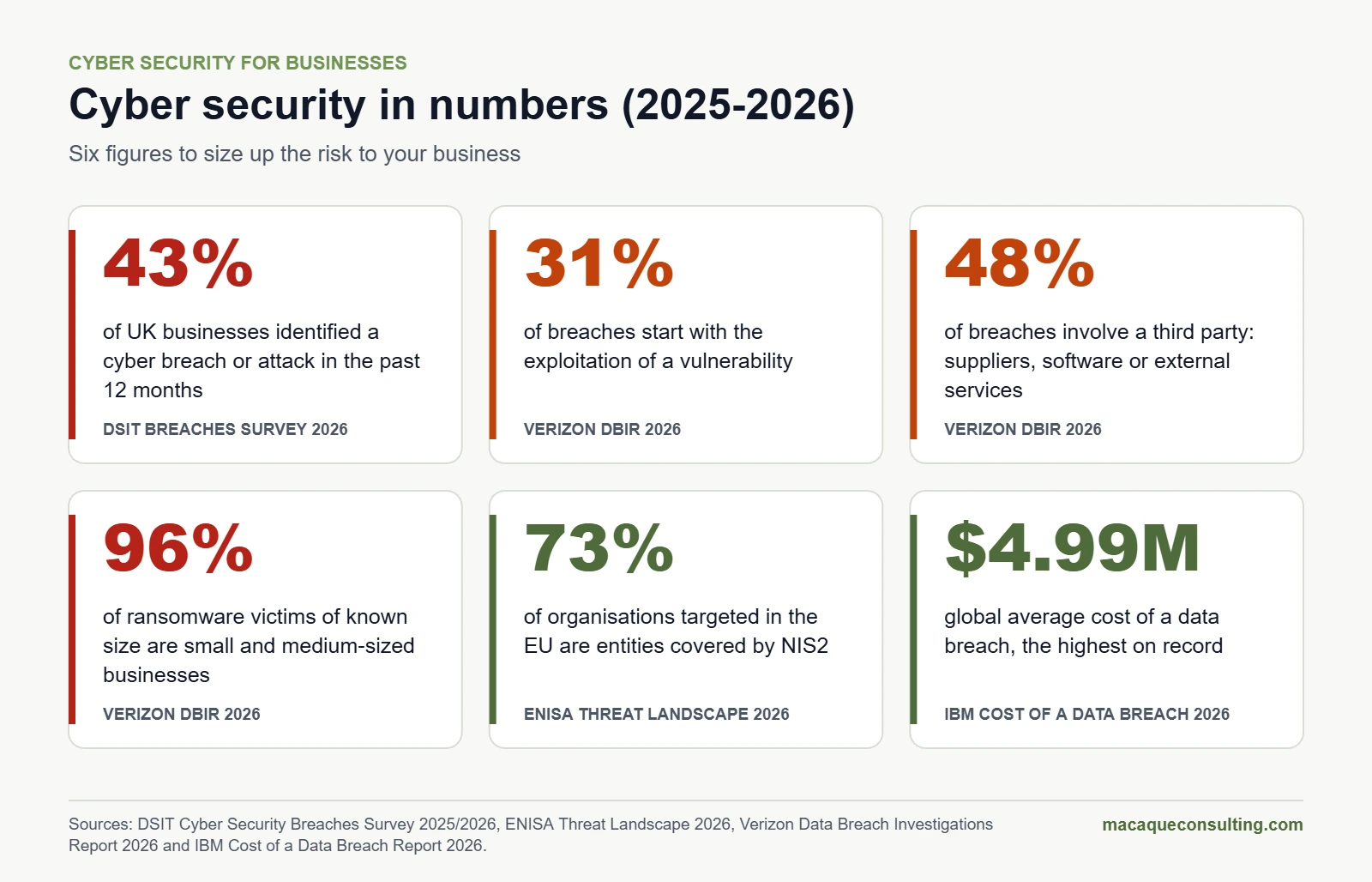
43% of businesses and 28% of charities identified a breach or attack in the previous 12 months.
The larger the business, the higher the figure: 42% of micro businesses, 46% of small, 65% of medium-sized and 69% of large businesses.
Phishing remains by far the most common attack (38% of businesses) and the most disruptive for 69% of those affected.
Spain: INCIBE's annual report
Spain's national cyber security institute, INCIBE, handled 122,223 incidents in 2025, up 26% on 2024:
Malware: 55,411 cases, 45% of the total, including 392 ransomware attacks.
Online fraud: 45,445 cases, four in ten incidents. More than 25,000 were phishing.
Data theft: 3,849 cases of unauthorised access to or extraction of data.
Vulnerable systems: 237,028 relevant exposed systems detected.
Europe: the ENISA Threat Landscape
ENISA's Threat Landscape 2026, published in September 2026, analyses 8,257 incidents in the European Union during 2025. The most useful findings for a business:
51% of cases were low-impact DDoS attacks, and almost nine in ten attacks claimed by hacktivists were of this type.
Ransomware remains the most impactful threat, accounting for 40% of the cybercrime events analysed.
Where the entry point of unauthorised access could be identified, 60% exploited a vulnerability.
73% of the organisations targeted are essential or important entities under NIS2, and public administration is the most affected sector (32%).
Dependence on suppliers and the supply chain amplifies the impact of incidents.
How attackers get in: the Verizon DBIR
Verizon's 2026 Data Breach Investigations Report, based on more than 22,000 confirmed breaches, marks a historic shift: for the first time in 19 editions, vulnerability exploitation (31% of breaches) has overtaken stolen credentials as the main way in.
A third party (a supplier, software or an external service) is involved in 48% of breaches, up 60% on the previous year.
Ransomware appears in 48% of breaches. Where the victim's size is known, 96% are small and medium-sized businesses.
69% of organisations hit by ransomware did not pay.
The median time to fully patch a vulnerability rose to 43 days, and Verizon warns that AI has cut the window for defence from months to hours.
What a breach costs: the IBM report
According to IBM's Cost of a Data Breach Report 2026, the global average cost of a data breach reached a record $4.99 million, up 12% on the previous year. AI-driven attacks grew by 56%: one in four malicious breaches now involves AI, mostly deepfake impersonation and AI-enabled malware, and they add around $1 million to the cost. Conversely, organisations that make extensive use of AI and automation in their security save $1.93 million on average and contain breaches 65 days sooner.
For a small or medium-sized business the absolute figures will be lower, but the proportion hurts just as much: days without trading, lost customers, forensic experts, lawyers, ransom demands and, sometimes, fines.
Key cyber security figures for 2025 and 2026. Sources: DSIT, ENISA, Verizon and IBM.
The threats that hit businesses hardest
Not all threats carry the same weight. These are the ones causing the most damage to businesses today, and what works against each one.
Phishing, smishing and vishing
Emails, texts or calls impersonating a bank, a supplier, the tax authority or a colleague to steal credentials or install malware. According to IBM, phishing has been the most common initial attack vector for four years running, and AI has removed the spelling mistakes and clumsy translations that used to give it away.
How to protect yourself: phishing-resistant multi-factor authentication, email filtering, training with simulations and an easy way to report suspicious messages.
CEO and supplier fraud, now with deepfakes
The attacker poses as the managing director or a supplier and asks for an urgent transfer or a change of bank details. With synthetic voices and video, a call "from the boss" no longer proves anything.
How to protect yourself: verification through a different channel before any urgent payment or change of bank details, authorisation limits and dual sign-off for large amounts.
Ransomware and double extortion
Attackers steal data, encrypt systems and demand a ransom to unlock them and to keep the stolen data private. ENISA ranks it as the most impactful threat, and it appears in almost half of the breaches Verizon analyses. Most victims are small and medium-sized businesses.
How to protect yourself: isolated or immutable backups that you have tested, EDR, network segmentation, up-to-date patching and MFA on all remote access.
Vulnerability exploitation
Known flaws in VPNs, firewalls, email servers or web applications that attackers exploit before they are patched. It is now the leading way into breaches, ahead of stolen credentials.
How to protect yourself: an inventory of everything exposed to the internet, absolute priority for vulnerabilities that are being actively exploited (for example, those in the US CISA's Known Exploited Vulnerabilities catalogue) and defined patching deadlines.
Stolen credentials and remote access
Leaked, reused or malware-stolen passwords that open the door to email, the VPN or remote desktop. A Microsoft study estimates that enabling multi-factor authentication reduces the risk of an account being compromised by 99.22%.
How to protect yourself: MFA everywhere, a company password manager, no remote desktop exposed to the internet and immediate removal of leavers' access.
Attacks through suppliers
Your accountant, your software vendor or the company that maintains your equipment has access to your systems or data. If they are breached, attackers can reach you. Almost half of all breaches now involve a third party.
How to protect yourself: a list of suppliers with access, security clauses in contracts, minimal and time-limited access and regular reviews of critical suppliers.
Cloud misconfiguration
Storage left public by mistake, excessive permissions in Microsoft 365 or Google Workspace, keys forgotten in a code repository. The cloud is secure when it is configured properly, and configuring it is the customer's responsibility, not the provider's.
How to protect yourself: configuration reviews against each provider's guidance, MFA for administrators, activity logs and alerts. If you are migrating, design security in from the start, as we do in our cloud services.
Insider leaks and unapproved AI
An employee pasting customer data into a free chatbot or sharing a file through a public link. Verizon notes that the use of unapproved AI at work has tripled and is now the third most common cause of non-malicious data leaks.
How to protect yourself: approved company AI tools, a clear usage policy and specific training for staff.
Summary: threats, warning signs and controls
Threat
Way in
Warning sign
Key control
Phishing
Email, text or call
Urgency, unexpected link or attachment
Phishing-resistant MFA and training
CEO fraud
Spoofed email or call
Urgent payment or change of bank details
Verification through another channel
Ransomware
Credentials, vulnerabilities or phishing
Encrypted files and a ransom note
Isolated backups and EDR
Vulnerabilities
Unpatched exposed systems
Vendor or CERT advisories
Prioritised patching
Stolen credentials
Leaked or reused passwords
Logins from unusual locations
MFA and a password manager
Suppliers
Third-party access and software
Incident reported by a supplier
Contracts and least-privilege access
Cloud misconfiguration
Public permissions or resources
Data accessible without logging in
Configuration review
DDoS
Flooding of the website or services
Sudden outage or slowdown
Provider's DDoS protection
Cyber security regulations that affect your business
There is no single "cyber security law". Several overlapping rules apply depending on where you operate, your sector, your size and what you do. This is the position as of November 2026.
NIS2: what it is and who it applies to
Directive (EU) 2022/2555, known as NIS2, is the EU's cyber security law for critical sectors. It replaces the first NIS Directive of 2016 and significantly widens its scope:
It generally applies to medium and large companies (50 or more employees, or more than €10 million in both turnover and balance sheet) in 18 sectors: energy, transport, banking, financial market infrastructures, health, drinking water, waste water, digital infrastructure, business-to-business ICT service management, public administration, space, postal services, waste management, chemicals, food, manufacturing (medical devices, electronics, machinery, vehicles and more), digital providers and research.
Some entities are covered regardless of size, such as DNS providers, top-level domain registries and trust service providers.
It distinguishes between essential and important entities. Essential entities face stricter supervision.
What it requires. Cyber risk management measures (Article 21): risk analysis, incident handling, business continuity and backups, supply chain security, vulnerability management, assessing the effectiveness of measures, basic cyber hygiene and training, encryption, access control and multi-factor authentication. On top of that, reporting significant incidents (Article 23) and management approval and oversight of all of it (Article 20).
Fines. Up to €10 million or 2% of worldwide turnover for essential entities, and up to €7 million or 1.4% for important entities, whichever is higher (Article 34).
Even if it does not apply to you, it affects you. If you supply a company covered by NIS2, your customer has to manage the security of its supply chain and will ask you for questionnaires, contract clauses and evidence.
Where NIS2 stands: the case of Spain
EU countries had until 17 October 2024 to transpose NIS2 into national law. Many have now done so; Spain has not. Its government approved a draft Cyber Security Coordination and Governance Act in January 2025, which would create a National Cyber Security Centre, but the text never reached Parliament. In July 2026 the European Commission referred Spain, along with Ireland, France and the Netherlands, to the Court of Justice of the EU and asked for financial penalties. Spain's Parliament was then dissolved in October 2026 ahead of a general election on 29 November, so the law will depend on the next government.
In the meantime, Spain's 2018 NIS law (Royal Decree-law 12/2018) still applies to operators of essential services and digital service providers, and companies supplying the Spanish public sector must comply with the National Security Framework (ENS). Our advice: if your sector is in scope, prepare now using the directive as your benchmark. National laws must include at least what the directive requires, and your customers are already asking for it.
The UK: NIS Regulations and the Cyber Security and Resilience Bill
The UK is not bound by NIS2. Its framework is still the Network and Information Systems Regulations 2018, which the Cyber Security and Resilience (Network and Information Systems) Bill will update. Introduced in November 2025, the Bill had passed the Commons and was in its final stages in the House of Lords in autumn 2026. Among other changes, it brings managed service providers and data centres into scope and strengthens incident reporting.
The government also backs Cyber Essentials, a certification of five basic technical controls that is required for some government contracts. And UK companies that sell into the EU or supply EU companies covered by NIS2 will feel NIS2 through their contracts anyway.
GDPR: security and personal data breaches
GDPR, and UK GDPR, which mirrors it, apply to any business handling personal data, which means almost all of them. They require security appropriate to the risk (Article 32) and, if a breach affects personal data, notification to the supervisory authority within 72 hours unless it is unlikely to result in a risk to individuals (Article 33): the ICO in the UK, the AEPD in Spain. Where the risk is high, the people affected must also be told without undue delay (Article 34). Failing these obligations can cost up to €10 million or 2% of worldwide turnover, or £8.7 million or 2% under UK GDPR.
DORA for financial services
Regulation (EU) 2022/2554, which has applied since 17 January 2025, requires banks, insurers, payment institutions, asset managers and other financial entities in the EU to manage ICT risk, report major incidents, test their resilience and oversee their ICT providers. If you provide technology services to a financial entity, you will see DORA in your contracts.
The Cyber Resilience Act, if you sell software or devices
Regulation (EU) 2024/2847, the Cyber Resilience Act (CRA), applies to products with digital elements placed on the EU market: software and connected devices. Since 11 September 2026, manufacturers have had to report actively exploited vulnerabilities and severe incidents. From 11 December 2027 the rest applies: security by design, vulnerability handling throughout the support period, technical documentation and CE marking. Fines reach €15 million or 2.5% of worldwide turnover. UK manufacturers selling into the EU are covered too.
The AI Act: cyber security for AI systems
The EU AI Act requires high-risk AI systems to be accurate, robust and cyber secure (Article 15), and systems that meet the Cyber Resilience Act are presumed to comply on that point. If you use or build AI, see our complete guide to the EU AI Act.
Summary: which rule applies and how fast you must report
Rule
Who it applies to
What it requires
Reporting deadline
Maximum fine
NIS2 (EU)
Medium and large companies in 18 sectors
Risk management, supply chain, MFA, training and board accountability
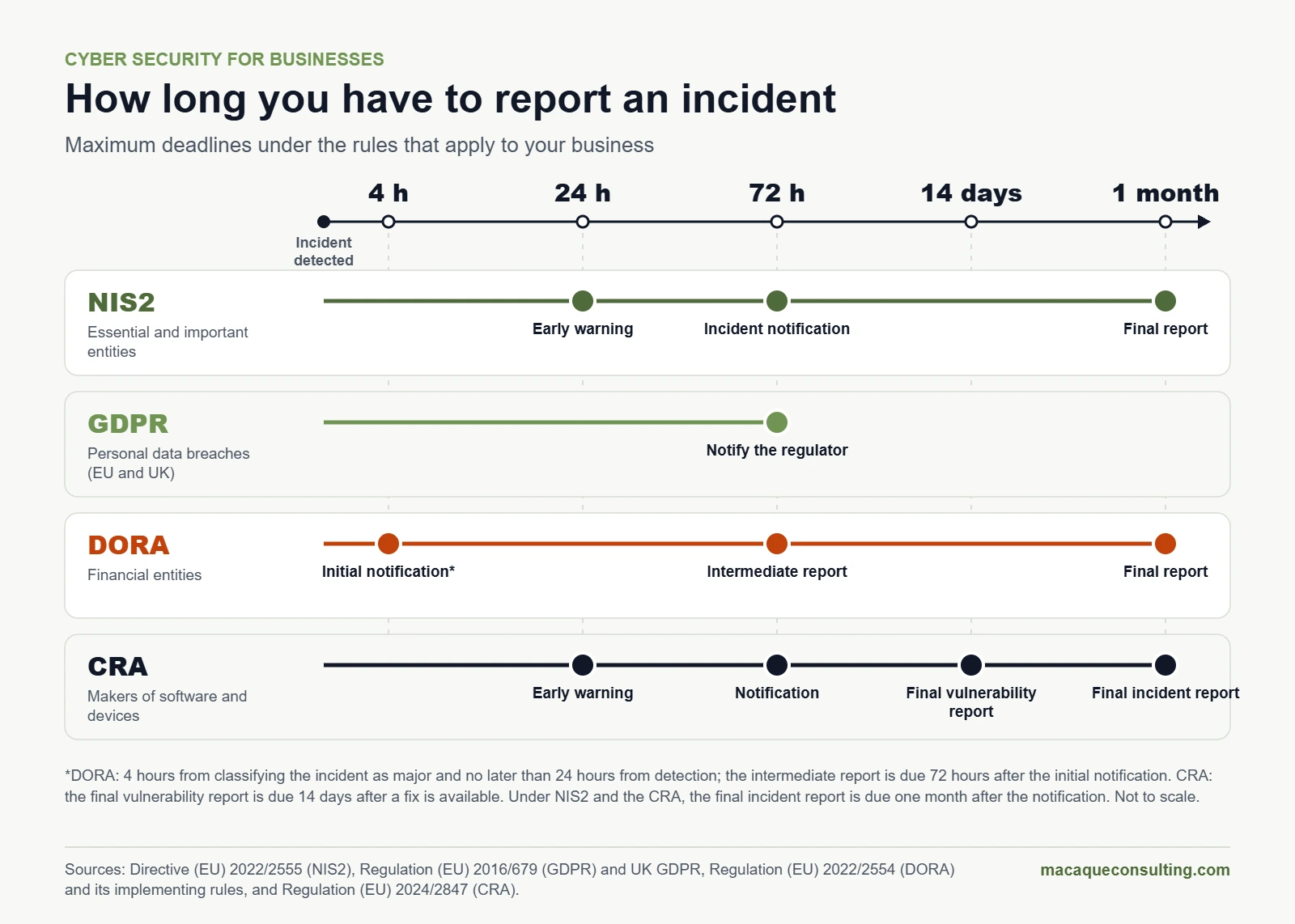
Early warning within 24 h, notification within 72 h and final report within one month
€10M or 2% (essential); €7M or 1.4% (important)
UK NIS Regulations 2018
Operators of essential services and relevant digital service providers in the UK
Appropriate security measures and incident reporting
Without undue delay and within 72 h
Up to £17M
GDPR and UK GDPR
Any business handling personal data
Security appropriate to the risk
72 h, to the supervisory authority
€10M or 2% (£8.7M under UK GDPR) for security failures
DORA (EU)
Financial entities
ICT risk, testing and oversight of providers
4 h after classification as major (24 h at most), 72 h and one month
Set by each member state
CRA (EU)
Makers of software and connected devices
Security by design and vulnerability handling
24 h, 72 h and 14 days (vulnerabilities) or one month (incidents)
€15M or 2.5%
Maximum deadlines for reporting an incident under NIS2, GDPR, DORA and the Cyber Resilience Act.
The 10 cyber security controls that protect you most
If you could only do ten things, these would be the ten, in this order. They cover the entry points of the vast majority of serious incidents, they match what NIS2 and Cyber Essentials ask for, and they are what insurers usually check before offering cyber cover.
1. Inventory of assets, data and access
You cannot protect what you do not know you have. List devices, servers, cloud services, applications, critical data and who has access to what, suppliers included. Start with everything exposed to the internet.
2. Multi-factor authentication on every login
Email, VPN, remote desktop, cloud, online banking and admin consoles. For administrators and senior management, use phishing-resistant methods such as FIDO2 security keys or passkeys. Text-message codes are better than nothing, but they are the weakest option.
3. Patching and vulnerability management
Set deadlines and stick to them: actively exploited flaws within days, critical ones within one or two weeks, everything else in the monthly cycle. Automate operating system and browser updates, and retire or isolate anything the vendor no longer supports.
4. 3-2-1-1-0 backups
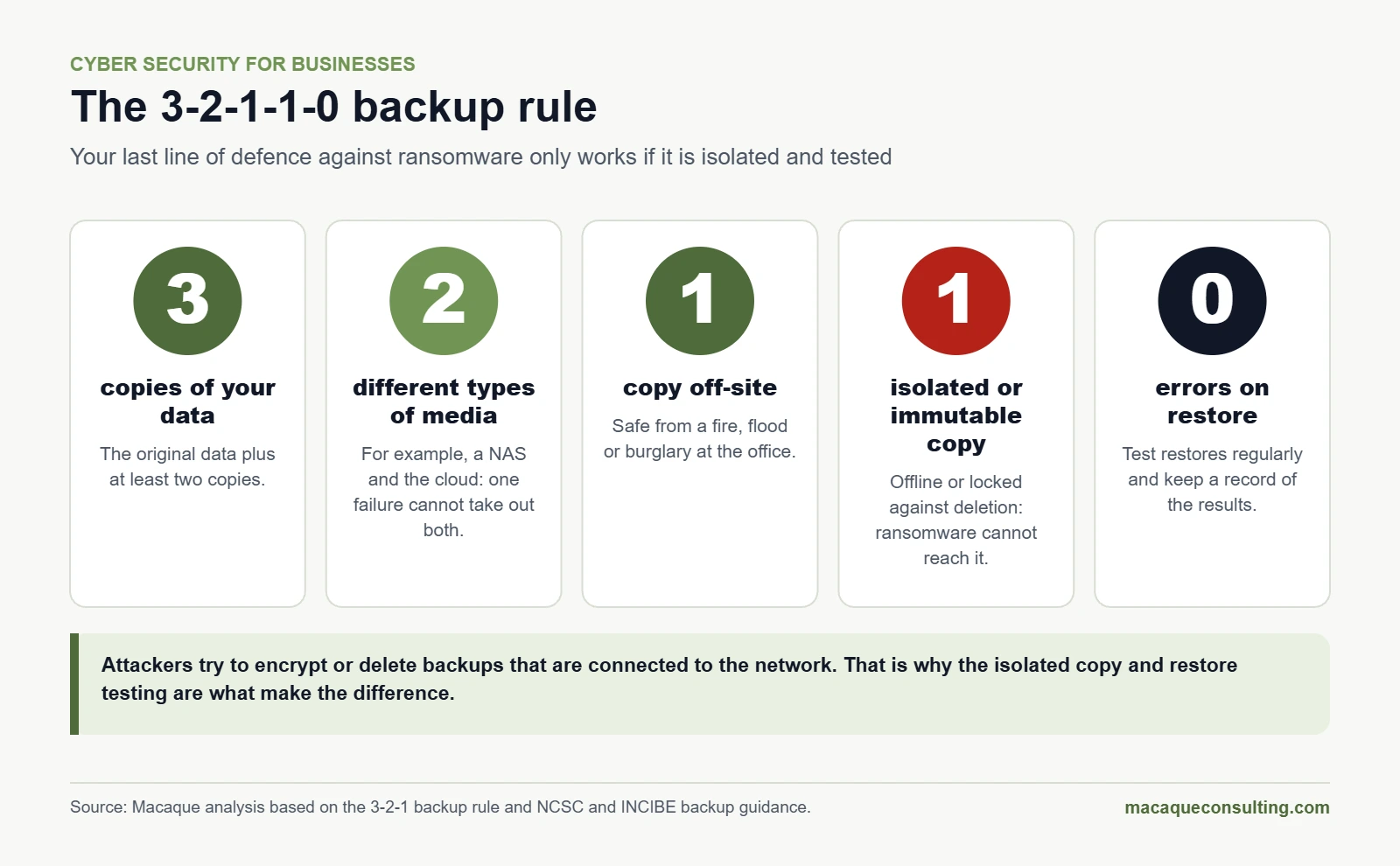
Three copies of your data, on two different types of media, one off-site, one isolated or immutable so ransomware cannot encrypt or delete it, and zero errors in restore tests. That last step is the one most often skipped: a backup you have never restored is a hope, not a backup.
The 3-2-1-1-0 rule: the isolated copy and restore testing are what save you from ransomware.
5. Endpoint and email protection
EDR (endpoint detection and response) on computers and servers spots suspicious behaviour, not just known viruses, and lets you isolate a device in seconds. Combine it with email filtering and blocking of macros and dangerous attachments. Also set up SPF, DKIM and DMARC on your domain: they make it much harder for anyone to send emails pretending to be your company, the basis of many CEO and supplier frauds. And encrypt laptop and phone storage and manage devices centrally (MDM), so that a lost device does not become a data breach.
6. Least privilege and network segmentation
Nobody should work day to day with an administrator account. Separate office, server, guest and industrial networks so that one infected device cannot reach everything. This is zero trust in practice: never assume something is safe just because it is "inside".
7. Ongoing training and awareness
One talk a year will not change habits. Short, frequent sessions, phishing simulations and a simple report button do. Measure how many people report, not just how many click.
8. Cloud and office suite security
Review the configuration of Microsoft 365, Google Workspace or your cloud platform, turn on audit logs, limit external sharing and protect admin accounts. Many breaches start with a setting nobody changed after day one. If you need help getting it in order, see our modern workplace services.
9. Supplier management
Classify suppliers by the access and data they handle. Require critical suppliers by contract to meet minimum standards (MFA, backups, timely incident notification) and review their access regularly.
10. Logging, monitoring and response
Keep activity logs, decide who watches the alerts and have a written, rehearsed response plan. If you do not have your own 24/7 team, a managed service (SOC or MDR) covers it.
How to build a cyber security plan in 90 days
A cyber security plan is not a 100-page document. It is a prioritised list of what will be done, by whom and by when. This is the outline we propose to mid-sized companies, and it scales to any size.
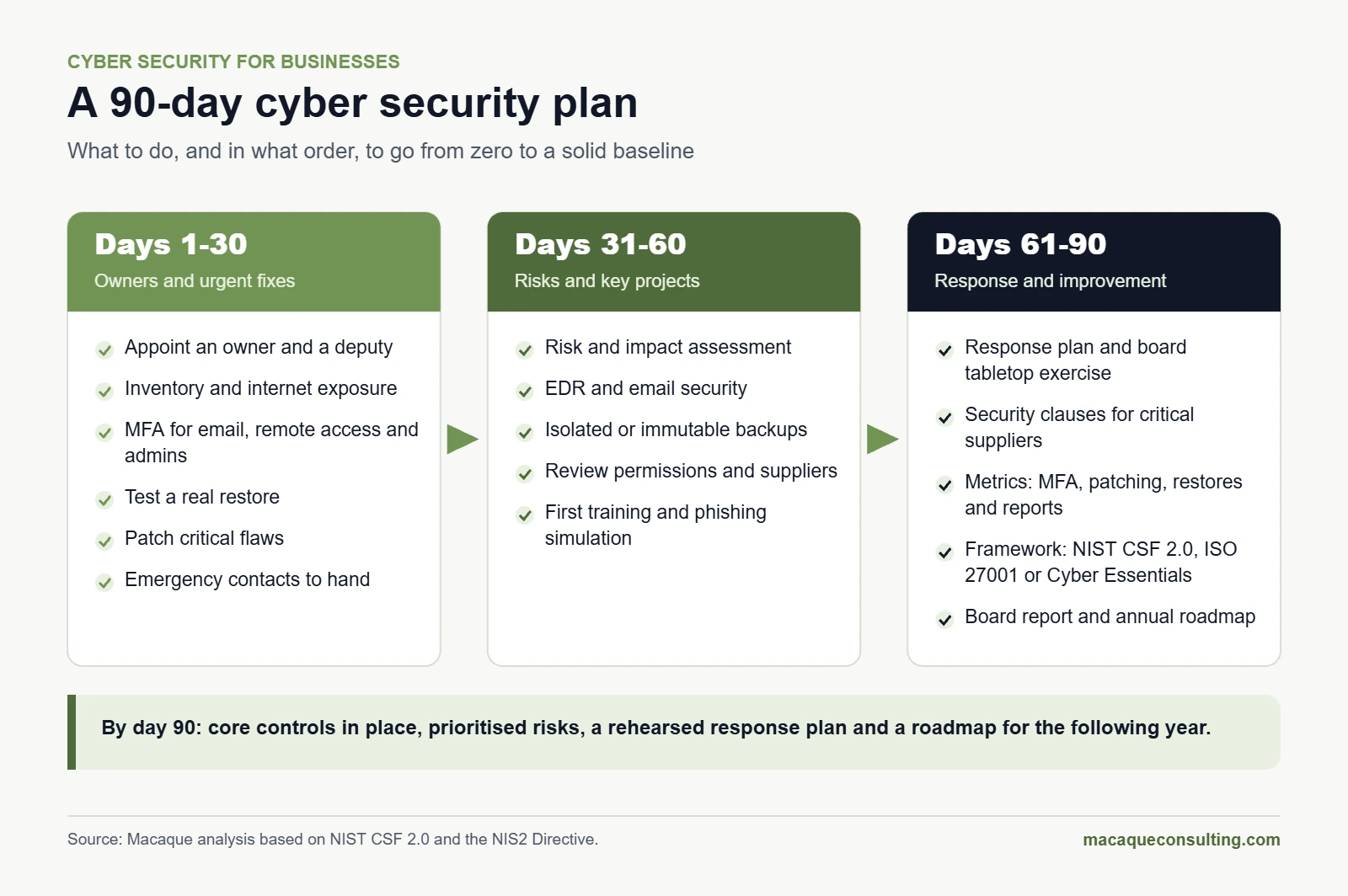
Days 1 to 30: owners and urgent measures
Appoint a cyber security lead and a deputy, with a direct line to senior management.
Build a basic inventory and identify everything exposed to the internet.
Turn on MFA for email, remote access and admin accounts.
Check that your backups work by restoring something real.
Patch critical flaws and shut down exposed services you do not need.
Keep emergency contacts to hand: IT provider, insurer and incident response.
Days 31 to 60: risk assessment and key projects
Assess your risks: which processes are critical, how long you can be down and which data you cannot lose.
Deploy EDR and harden email security.
Introduce isolated or immutable backups.
Review permissions, leavers' accounts and supplier access.
Run the first training session and the first phishing simulation.
Days 61 to 90: response, suppliers and continuous improvement
Write the incident response plan and run a tabletop exercise with the leadership team.
Classify critical suppliers and add security clauses to their contracts.
Set metrics: percentage of accounts with MFA, days to patch, tested restores and phishing report rate.
Choose a framework (NIST CSF 2.0, ISO 27001 or Cyber Essentials) and plan the following year.
Report progress and outstanding risks to the board.
A 90-day cyber security plan to go from zero to a solid baseline.
Which framework to choose
Framework
Who it suits
What it offers
NIST CSF 2.0
Any company that wants to structure its cyber security
Six functions (govern, identify, protect, detect, respond and recover) and a common language with the board. Free.
ISO/IEC 27001
Companies that need to prove their security to customers
A certifiable management system with 93 reference controls in the 2022 version.
Cyber Essentials
UK businesses, especially those bidding for public contracts
Government-backed certification of five basic technical controls.
CIS Controls
Technical teams that want a prioritised list
18 controls with three implementation groups by size and resources. Free.
Cyber security by company size
Sole traders and micro businesses
The essentials fit into an afternoon: MFA everywhere, automatic updates, a password manager, one backup in the cloud and another offline, modern antivirus and systematic suspicion of any request to change bank details. In the UK, the NCSC's Small Business Guide is a good free starting point.
Small and medium-sized businesses
You need a named owner with time set aside, someone watching the alerts (installing tools is not enough), isolated backups, EDR, regular training and a response plan. If you supply large companies or the public sector, expect NIS2 questionnaires or Cyber Essentials requirements.
Mid-sized and large companies
Formal governance with a CISO, in-house or fractional; an annual risk assessment; 24/7 monitoring; penetration testing; third-party risk management; exercises; and regular reporting to the board. If your sector is covered by NIS2 or the UK's new rules, all of this becomes a legal obligation.
Size
Priorities
Typical model
Fewer than 10 people
MFA, backups, updates and a password manager
Trusted IT provider and free official resources
10 to 49
All of the above, plus EDR, training, an internal owner and a response plan
Managed service
50 to 249
All of the above, plus risk assessment, SOC, supplier control and NIS2 where it applies
Internal owner, external SOC and fractional CISO
250 or more
Formal governance, testing, audits and board reporting
In-house team and specialist services
In-house team or managed cyber security?
Few companies can staff a 24/7 security team. The usual approach is to combine a named owner inside the business with external services:
Cyber security audit: a snapshot of where you stand and a prioritised plan. It is the best starting point if you do not know where you are, and it is part of our complete technology audit.
Penetration testing: an authorised team tries to break in as an attacker would and shows you how they did it.
SOC or MDR: 24/7 monitoring and response across your devices, network and cloud.
Fractional CISO: part-time cyber security leadership that liaises with the board and the auditors.
Training and phishing simulations for all staff.
How to choose a cyber security provider
Before you sign, ask:
Who watches the alerts at night and at weekends, and how quickly do they act?
What exactly happens if they detect ransomware at three in the morning?
What certifications do they hold (ISO 27001, Cyber Essentials Plus, ENS) and what experience do they have in your sector?
Do their reports make sense to the board, not just to technicians?
Where are your data and logs stored?
How will they help you meet NIS2, DORA or UK requirements if they apply to you?
What does the price include, and what is billed separately during an incident?
Cyber insurance: what it covers and what insurers will ask
Cyber insurance covers part of the financial fallout of an incident: incident response and forensics, data and system recovery, business interruption losses, third-party liability, notification costs and, depending on the policy, legal defence.
It does not replace security. Insurers will ask about MFA, backups, EDR, patching and training, and if you declare controls you do not actually have, the policy may not pay out. Check exclusions, excesses, notification deadlines and whether the insurer's response line really works around the clock.
What to do after a cyber attack: the first 72 hours
What you do in the first few hours decides how much you lose. Keep this plan on paper: you may not have access to your systems during the incident.
When
What to do
First hour
Disconnect affected devices from the network (unplug the cable or turn off Wi-Fi, but do not switch them off). Alert the owner and activate the response plan. Do not delete anything and do not pay anything.
First 24 hours
Call your incident response team and your insurer. Preserve evidence and logs. Change passwords from a clean device. If you are a regulated operator, send the early warning or notification your rules require.
Up to 72 hours
Notify the data protection authority if personal data is affected. Report the crime to the police. Decide what to tell customers and staff. Restore from clean, verified backups.
Afterwards
Final report, lessons learned, fixing the root cause and updating the plan.
Should you pay the ransom?
Authorities advise against paying: it does not guarantee you will get your data back or that it will not be published, it funds further attacks and it marks you as a victim who pays. According to Verizon, 69% of affected organisations no longer pay. If you have isolated, tested backups, the question hardly arises.
Who to contact in the UK
Report Fraud: the national service for reporting cyber crime and fraud in England, Wales and Northern Ireland, which replaced Action Fraud. Report online at reportfraud.police.uk or call 0300 123 2040, and call straight away if you are under live attack. In Scotland, call Police Scotland on 101.
ICO: personal data breaches, within 72 hours.
NCSC: significant incidents, through its incident reporting service.
Your insurer: within the policy deadline, and before hiring anyone yourself if the policy requires it.
Who to contact in Spain
INCIBE: the free and confidential 017 helpline, WhatsApp on 900 116 117 or Telegram at @INCIBE017.
Your reference CSIRT if you are an operator of essential services or a digital service provider: INCIBE-CERT for the private sector and CCN-CERT for the public sector.
The AEPD, Spain's data protection authority: personal data breaches, within 72 hours.
Policía Nacional or Guardia Civil: to report the crime.
Cyber security by sector
The basics are the same for everyone, but each sector has its own risks and rules:
Banking and insurance: DORA since 2025, plus NIS2. Resilience testing and strict oversight of technology providers.
Health: data that GDPR protects as a special category and systems that cannot stop. According to IBM, healthcare has had the most expensive breaches for 13 years running.
Manufacturing: old but connected industrial systems, very costly production stoppages and, if you make connected products, the Cyber Resilience Act.
Energy and transport: high-criticality sectors under NIS2, with stricter obligations and supervision.
Public sector: the ENS in Spain, and Cyber Essentials for some UK government contracts.
Retail and distribution: card payments (PCI DSS), online fraud, customer account takeover and traffic peaks that attract DDoS attacks.
Free resources and support
NCSC (UK): the Small Business Guide, the Cyber Security Toolkit for Boards and Cyber Essentials.
INCIBE (Spain): the "Protege tu empresa" guides and tools, an awareness kit for staff and the 017 helpline.
ENISA (EU): guidance and threat reports for European organisations.
CISA's Known Exploited Vulnerabilities catalogue: the list of vulnerabilities being actively exploited, to help you prioritise patching.
Cyber security checklist for businesses
Tick what you already have. Every "no" is a task for your plan.
A named person owns cyber security and the board reviews it at least quarterly.
We have an inventory of devices, cloud services, critical data and suppliers with access.
MFA is on for email, remote access, cloud services and admin accounts.
We use a company password manager.
Systems and applications are updated within defined deadlines.
No unsupported systems are exposed to the internet.
We follow the 3-2-1-1-0 backup rule and have tested a restore this quarter.
Every computer and server has EDR.
Email filtering blocks phishing and dangerous attachments, and our domain has SPF, DKIM and DMARC.
Nobody uses an admin account for day-to-day work.
The network is segmented: office, servers, guests and industrial systems.
Leavers' accounts are disabled on their last day.
Staff receive training and phishing simulations.
Any urgent payment or change of bank details is verified through another channel.
Critical suppliers have security clauses and least-privilege access.
We review the configuration of Microsoft 365, Google Workspace or our cloud.
We keep activity logs and someone reviews the alerts.
We have a written response plan and we have rehearsed it.
We know who to notify and by when: regulators, police, insurer and customers.
There is an AI usage policy and a list of approved tools.
Quick cyber security glossary
The acronyms you will hear most often from suppliers and auditors, in plain English.
Term
What it means
MFA
Multi-factor authentication: a second factor on top of the password (an app, a security key or a fingerprint).
Phishing
Deception by email, text message (smishing) or phone call (vishing) to steal credentials or install malware.
Ransomware
Malware that encrypts your systems and demands a ransom. Today it usually steals data first.
EDR
Endpoint detection and response: protects computers and servers by analysing how they behave.
XDR
An evolution of EDR that also correlates email, network, identity and cloud signals.
SOC
Security operations centre: the team that watches the alerts and responds.
MDR
Managed detection and response: an external SOC that monitors and acts on your behalf, usually 24/7.
SIEM
A platform that centralises and correlates activity logs to detect attacks.
DMARC
An email policy that, together with SPF and DKIM, lets receiving servers reject emails that spoof your domain.
Zero trust
An approach that never assumes a connection is safe just because it is "inside" and always verifies.
Penetration testing
An authorised attempt to break in, to find the way an attacker could get in.
CSIRT or CERT
An incident response team. In the UK, the NCSC plays this role; in Spain, INCIBE-CERT and CCN-CERT.
Frequently asked questions about cyber security for businesses
What is cyber security for businesses?
It is the set of technical, organisational and human measures that protect a company's systems, data and operations against attacks, theft and error, and that allow it to recover quickly if something goes wrong.
Which cyber security laws does my business have to follow?
Almost every business must comply with GDPR or UK GDPR. Depending on your sector, size and market, you may also be covered by NIS2 or the UK NIS Regulations, by DORA if you are a financial entity, and by the Cyber Resilience Act if you sell software or connected devices in the EU.
Is NIS2 already in force?
EU countries had to bring it into national law by 17 October 2024, and it binds companies through those national laws. Many countries have done so, but Spain, for example, still had not as of November 2026. In practice, customers, insurers and auditors already use NIS2 as their benchmark.
How much does cyber security cost for a small business?
It depends on your size, your sector and what you already have. The most effective measures (MFA, patching, backups and training) are also the cheapest. The most expensive element is 24/7 monitoring, which is why it is usually bought as a service. Always compare the cost with what a few days of downtime would cost you.
Where do I start if I have nothing in place?
With four things this week: MFA on email and remote access, up-to-date systems, an offline backup you have tested by restoring it, and a named owner. Then follow the 90-day plan in this guide. In the UK, Cyber Essentials gives you a good checklist for the basics.
What should I do if we have been hacked?
Disconnect affected devices from the network without switching them off, do not delete anything, call your incident response provider and your insurer and, if personal data is affected, notify the data protection authority within 72 hours. Report the crime too: to Report Fraud in the UK or to the police in Spain.
Is it mandatory to report a cyber attack?
Yes, if it affects personal data (to the ICO or the relevant authority within 72 hours), if you are a regulated operator under NIS rules, if you are a financial entity under DORA, or if you make products with digital elements under the CRA (since September 2026). Otherwise it is not mandatory, but reporting it helps the police and the authorities protect others.
Is antivirus enough?
No. Traditional antivirus catches known threats, but today's attacks use stolen credentials and legitimate tools. You need EDR, MFA, patching, isolated backups and someone reviewing the alerts.
Is cyber insurance worth it?
For many businesses, yes, as a complement: it covers part of the cost of an incident and usually includes a response team. But it requires the basic controls to be in place, and it does not prevent the attack or the downtime.
What is the difference between ISO 27001 and Cyber Essentials?
ISO 27001 is an international standard that certifies a complete information security management system. Cyber Essentials is a UK government-backed scheme that certifies five basic technical controls. Many companies start with Cyber Essentials and move on to ISO 27001 as they grow.
How does AI affect my company's cyber security?
In both directions. Attackers use it to write convincing phishing, clone voices and exploit vulnerabilities faster: according to IBM, one in four malicious breaches now involves AI. Companies that use it in their defences detect and contain breaches sooner. The new risk is internal: staff uploading data to unapproved AI tools.
CEO and co-founder of Macaque Group, a technology group based in Calafell (Tarragona, Spain) that specialises in artificial intelligence, software development and IT outsourcing. He advocates AI without the hype: AI that solves real business problems, delivers measurable results and makes it into production. He is a member of OdiseIA, the Spanish observatory on the social and ethical impact of AI, and has been published in Capital Humano (Wolters Kluwer).
Certification corresponding to Macaque Consulting Scope according to certificate.
We process your personal data in accordance with the General Data Protection Regulation (GDPR) and Organic Law 3/2018 (LOPDGDD). See our Privacy Policy.
Obtained
ISO 27701
In progress
ISO 9001
In progress
ENS ALTO
In progress
ISO 42001
Under review
Obtained
ISO 27701
In progress
ISO 9001
In progress
ENS ALTO
In progress
ISO 42001
Under review
Members of
Let's talk about your project
Tell us what you need and we'll reply within 24 working hours.
We drive your business with technology and artificial intelligence
Personalised advice
We analyse your case and propose solutions tailored to your business
Continuous support
From the initial idea through product evolution
Scalable solutions
Technology prepared to grow with you
Availability
Monday - Friday:09:00 - 19:00
Response within 24 hours
This site uses cookies
We use first-party and optional cookies. You can accept them all, reject non-essential cookies or configure them by category. Optional categories are disabled by default and you can change your decision at any time from Cookie settings in the footer.